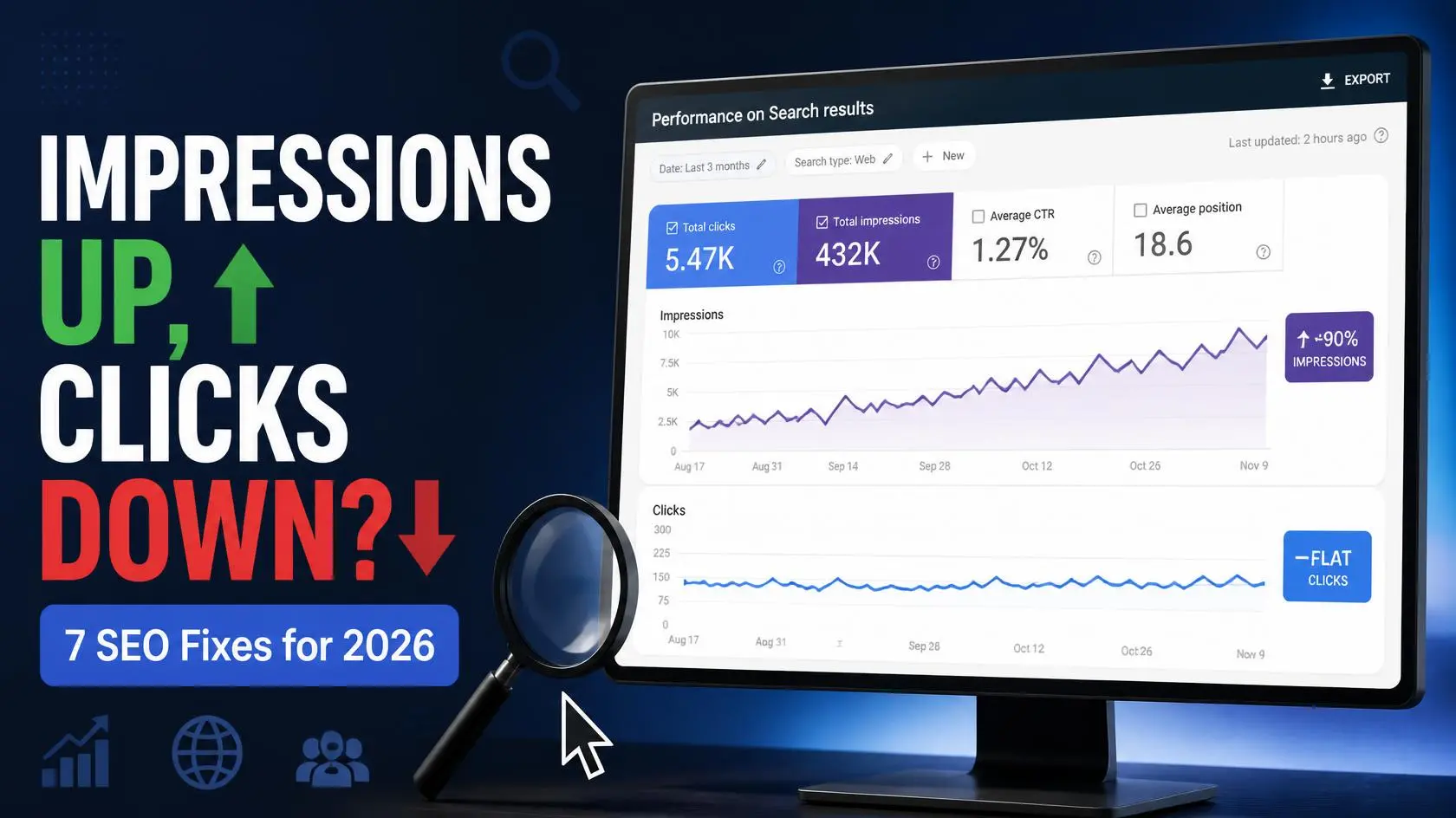
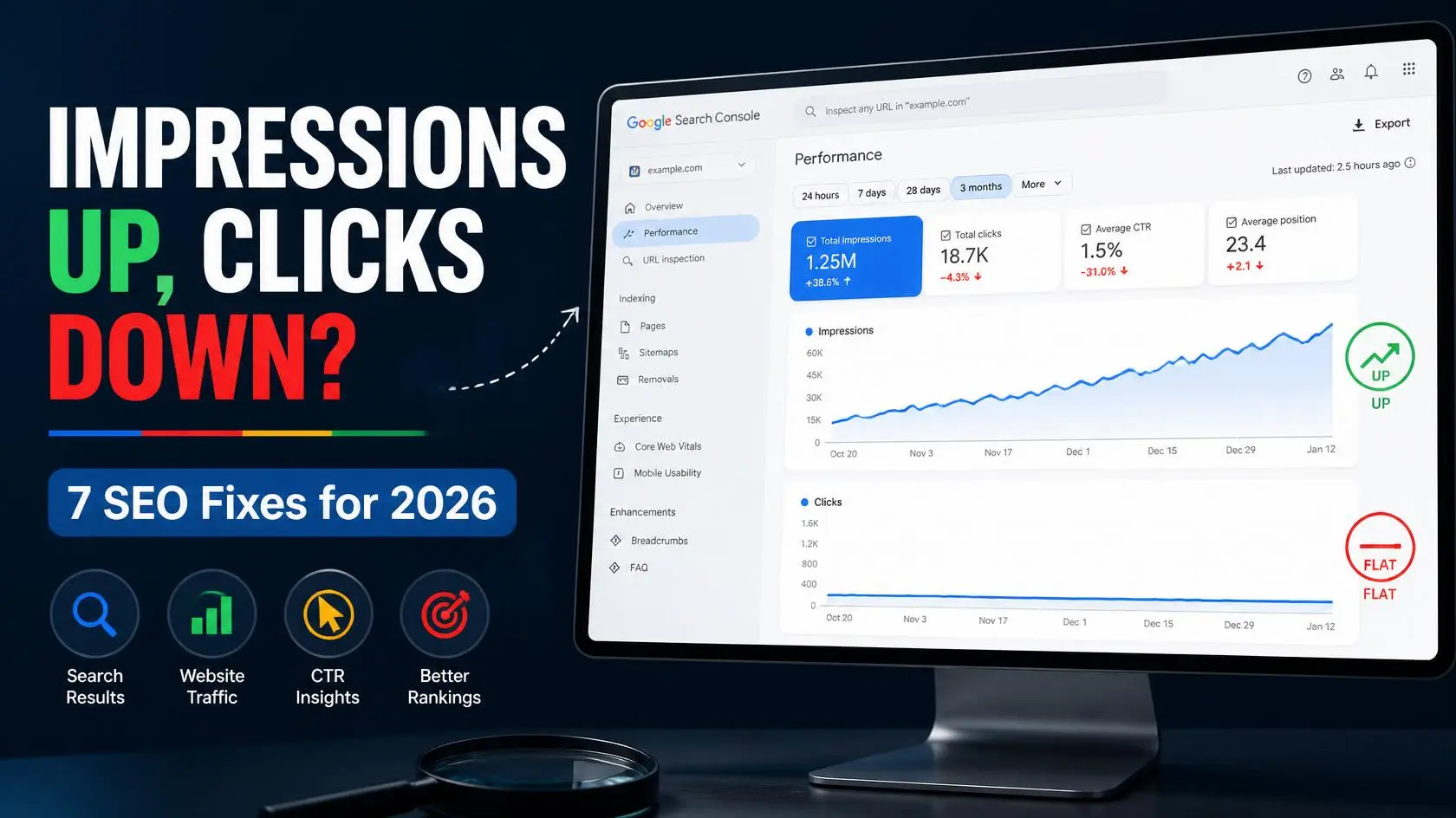
You open Google Search Console, check the Performance report, and see it: impressions up, clicks flat. Your pages are showing up more. Google is noticing you.
Then you look at the clicks graph next to it.
Flat. Barely moving. Sometimes even lower than a month ago.
If that’s you right now, you’re not doing anything wrong on the content side — this is one of the most common frustrations site owners ran into in 2026. The good news is that it’s usually fixable, and in a few cases, it isn’t even a real problem at all. Let’s go through why this happens and exactly what to do about it.
Wait — Check This First: The 2026 GSC Impression Bug
Before you touch your titles or meta descriptions, rule out something bigger.
Google confirmed that a logging error affected impression reporting in Search Console from May 13, 2025, through April 27, 2026. The issue affected impression reporting, but not clicks. This means some historical impression data from that period may not accurately represent your site’s actual search visibility.
This matters if you’re comparing older Search Console data with more recent numbers. A change in reported impressions around the end of April 2026 does not necessarily mean your SEO performance suddenly changed.
How to check: Compare your Performance report data from before and after April 27, 2026. If impressions changed significantly around that period while clicks remained relatively stable, the reporting anomaly may explain part of the difference. For more recent data, continue with the checks below to determine whether you have a genuine click-through problem.
Why Impressions Rise, But Clicks Don’t
An impression means your page appeared in Google Search for a query, but it doesn’t necessarily mean the searcher noticed or interacted with your result. Clicks are an important measure of how often search visibility turns into a visit. Still, they should be interpreted alongside impressions, CTR, average position, search intent, and the features appearing on the results page. A page can generate many impressions while ranking below the most prominent results, or it can rank well and still receive fewer clicks because the search result doesn’t give users a strong reason to choose it.
Here’s what’s usually behind the gap.
7 Fixes for Impressions Up, Clicks Flat
1. Check Your Average Position First
Your average position is one of the first things to check when impressions increase without a similar increase in clicks. If many of your impressions come from positions 8–20, your pages are appearing in Google Search but are often below the most prominent results, which can lead to fewer clicks.
Open the Performance report in Google Search Console, select Search results, and review the Clicks, Impressions, CTR, and Average position metrics. Then look at the individual queries and pages generating the most impressions.
If important queries are consistently ranking outside the top results, improving the content, matching search intent, and strengthening relevant internal links may be more useful than changing the title alone. If you want additional tools to analyze and improve your marketing performance, see our list of the best AI marketing tools in 2026.
2. Rewrite Titles to Close a Curiosity Gap
A title such as SEO Services | Company Name may give searchers too little information about what they will find on the page. Write a clear, descriptive title that accurately represents the content and gives users a reason to choose your result. Put the main topic or important keyword where it makes sense, avoid unnecessary repetition, and keep the wording concise. Don’t worry about hitting a specific character limit—Google may shorten the title displayed in search results depending on the available space and device.
Example
Before:
SEO Tips for Beginners
After:
10 SEO Tips for Beginners to Increase Google Traffic in 2026
The second title is more specific and gives searchers a clearer reason to click. It highlights what readers can expect and better matches users looking for practical, actionable SEO advice.
3. Fix Your Meta Descriptions
Meta descriptions don’t directly affect rankings, but a useful description can help searchers understand why your page is relevant and may encourage them to click. Write a concise, specific description that accurately summarizes the page and matches the searcher’s intent. Include the main topic or keyword naturally when appropriate, but avoid keyword stuffing. Keep in mind that Google may use your meta description or generate a different snippet from the content on the page.
4. Account for Featured Snippets and AI Overviews
Search results can contain more than traditional blue links. Depending on the query, Google may show AI Overviews, featured snippets, videos, images, shopping results, or other search features. These features can change how much attention traditional organic listings receive, so check the actual search results for the queries generating your impressions. For a deeper look at how AI-generated search results can affect organic traffic, see our guide to AI Overviews and traffic drops.
Don’t automatically assume that an AI Overview is responsible for fewer clicks. Google says AI Overviews can provide links that help users explore information from websites, and clicks from AI features can be valuable. The important step is to compare your impressions, clicks, CTR, and average position for the affected queries and look at how the search results have changed.
When improving your page, focus on providing a clear, direct answer to the searcher’s question and then add useful detail, examples, evidence, and original information. Don’t write to a specific word count simply to try to win an AI Overview or featured snippet.
5. Match Search Intent to Page Format
If someone searches for a question and lands on a page that doesn’t match what they were looking for, they may return to the search results and choose another result. Before changing your title, check what type of content currently appears for the queries generating your impressions. If Google is mainly showing step-by-step guides, comparisons, lists, or other specific formats, make sure your page provides the information and format that best satisfies the searcher’s intent. The goal isn’t to copy competing pages, but to create a more useful and complete result for the person searching. If you’re building your SEO strategy from the ground up, start with our Beginner Digital Marketing Roadmap 2026.
6. Look for Keyword Cannibalization
If multiple pages on your site target very similar search queries and provide overlapping information, review whether each page has a clearly different purpose. In some cases, consolidating overlapping content or making the pages more distinct can create a clearer site structure and help Google understand which page is most relevant for a particular topic. You can use a Google search such as site:yourdomain.com "your keyword" to find potentially competing pages, but remember that the site: operator isn’t guaranteed to show every indexed URL. For a more reliable diagnosis, use Google Search Console to check which pages are receiving impressions and clicks for the same query.
7. Add Structured Data (Schema Markup)
Structured data can help Google understand the content and purpose of a page and can make eligible pages suitable for supported rich-result features. However, structured data does not guarantee that Google will display a rich result, and you shouldn’t add schema simply to try to increase clicks. Use structured data that accurately represents the content on your page and follows Google’s requirements. For example, relevant Article or Breadcrumb structured data may help Google understand your content, while FAQ rich results are no longer displayed in Google Search as of May 7, 2026. After adding or changing structured data, use Google’s Rich Results Test and monitor the relevant Search Console reports for errors or changes in eligibility.
How to Tell If It’s Actually Fixed
Don’t judge a change immediately. Google needs time to recrawl and reprocess updated pages, and you also need enough search data to determine whether the change made a meaningful difference. Depending on the page and its search volume, this can take days to several weeks. Compare the same page and queries before and after the change, and look at clicks, impressions, CTR, and average position together rather than relying on one metric. Tracking individual pages and queries can reveal improvements that a sitewide average might hide.
New in 2026: Check Your Generative AI Visibility in Search Console
Google introduced a dedicated Search Generative AI performance report in Search Console in June 2026. The report provides a separate view of your site’s visibility within generative AI features on Google Search, including AI Overviews and AI Mode. Google says this data is also included in the overall Performance report, so you can use the dedicated report to get a clearer view of how generative AI features are contributing to your site’s search visibility. Want to understand what these new Search Console AI reports actually show? Read our guide to Search Console AI Reports in 2026.
If your impressions are increasing but clicks remain relatively flat, this report can give you another piece of the puzzle. Instead of assuming that AI features are responsible, compare your overall Search Console performance with the visibility shown in the Generative AI report. Look at which pages and queries are receiving impressions and whether the pattern has changed over time. You can also learn how to optimize your content for visibility across AI answer engines in our GEO checklist.
Important: Don’t treat generative AI impressions as a guarantee of traffic. Visibility in an AI feature and a traditional organic click are different things. Use the report as an additional diagnostic tool alongside clicks, impressions, CTR, and average position.
Google also recommends continuing to follow foundational SEO practices for AI Search: create unique, useful content, make your pages crawlable and indexable, and provide information that adds value beyond what is already available elsewhere.
Frequently Asked Questions
Why are my Google Search Console impressions increasing but clicks aren’t?
There can be several reasons. Your impressions may be increasing because you’re appearing for more queries or ranking in positions that generate visibility but relatively few clicks. Other possibilities include a lower CTR, a change in search intent, or changes to the search results page such as AI Overviews and other SERP features. Check your clicks, impressions, CTR, average position, and the individual queries and pages driving the change before deciding what to fix.
Is the 2026 Google Search Console data anomaly still affecting my data?
No. Google says the Search Console logging issue was resolved on April 27, 2026. The issue affected impression reporting from May 13, 2025, through April 27, 2026, while clicks were not affected. As a result, you may notice changes in reported impressions when comparing affected historical data with newer data. Treat impressions, CTR, and average position from the affected period cautiously when making year-over-year comparisons.
Does a low CTR hurt my rankings?
A low CTR in Google Search Console does not automatically mean that Google will lower your rankings. CTR is better used as a diagnostic metric. If a page receives many impressions but relatively few clicks, examine its average position, search intent, title, snippet, and the search features appearing for those queries. A low CTR can show you that your search visibility is not translating into as many visits as you might expect, but it should be analyzed in context rather than treated as a direct ranking signal.
How long does it take to see CTR improve after changing a title?
There isn’t a fixed timeframe. Google needs to recrawl and reprocess the updated page, and you need enough impressions and clicks to make the comparison useful. Depending on the page and its search volume, meaningful changes may become visible within days or may take several weeks. Compare the same page and relevant queries before and after the title change, and evaluate clicks, impressions, CTR, and average position together.
Quick GSC Checklist
- Check which queries gained impressions.
- Compare clicks and CTR.
- Review average position.
- Identify pages ranking between positions 5–20.
- Check the actual Google search results.
- Improve titles and snippets where appropriate.
- Review search intent.
- Check for competing pages targeting similar queries.
- Monitor changes for several weeks.
Final Takeaway
If your Google Search Console impressions are increasing while clicks remain flat, don’t panic or immediately rewrite every title on your website. Start by checking where your impressions are coming from, which queries are driving visibility, and whether your average position and CTR have changed.
Focus on improving pages where you already have meaningful impressions but are not converting that visibility into clicks. Better search intent matching, clearer titles, stronger snippets, useful content, and improved rankings can gradually turn impressions into real traffic.
Most importantly, analyze clicks, impressions, CTR, and average position together. Looking at only one metric can lead to the wrong conclusions.